Navigating BCcampus Pressbooks
About this resource
Pressbooks is a WordPress-based publishing platform that has been used for over ten years by BCcampus and B.C. post-secondary faculty and staff. Did you know that BCcampus operates two different Pressbooks networks?
BCcampus Open Publishing
Our first Pressbooks network is for BCcampus Open Publishing projects and is located at opentextbc.ca. This site hosts books that are published and maintained by BCcampus staff, including open textbooks developed through BCcampus’ open publishing grants, and professional development resources for post-secondary faculty and staff.
To browse books on opentextbc.ca using the Pressbooks Directory, filter by Network and select “BCcampus Open Publishing.”
Books in this network feature the BCcampus logo in the top-left corner of the page. Links and chapter navigation button on this site are blue and consistent with BCcampus branding.
Home page of Writing for Success – 1st Canadian H5P Edition by Tara Horkoff.
.
Chapter in Writing for Success – 1st Canadian H5P Edition by Tara Horkoff.
B.C./Yukon Open Authoring Platform
Our other Pressbooks network is the British Columbia/Yukon Open Authoring Platform, which is available at pressbooks.bccampus.ca. This is a self-publishing site available to faculty and staff at any post-secondary institution in B.C. or the Yukon. Some of the books on this network can be found in the B.C. Open Collection, but the majority of books published here are not created or maintained by BCcampus.
Self-published authors on this network are responsible for the content and upkeep of their publications. If you notice an error in a self-published book and would like to notify the author, check the book’s front matter to see if they have included contact information. Alternatively, you can look at the book’s metadata on the home page to find the author’s affiliated post-secondary institution, and then search for them in the institution’s staff directory.
To browse books on pressbooks.bccampus.ca using the Pressbooks Directory, filter by Network and select “British Columbia/Yukon Open Authoring Platform.”
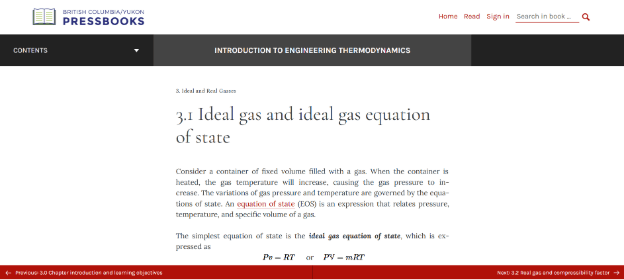
The B.C./Yukon Open Authoring Platform has its own logo, featuring a book and the words “British Columbia/Yukon Pressbooks.” Navigation buttons and links are typically red.
Home page of Introduction to Engineering Thermodynamics by Claire Yu Yan.
Chapter in Introduction to Engineering Thermodynamics by Claire Yu Yan.
Getting Started with Pressbooks
Interested in creating your own content in Pressbooks? If you work at a post-secondary institution in B.C. or the Yukon, visit pressbooks.bccampus.ca and create a free account using your institutional email address. For detailed instructions, view the chapter on Pressbooks Accounts in the BCcampus Pressbooks Guide.
The Pressbooks Guide contains lots of information about creating, editing, and importing content in Pressbooks. If you prefer a video format, view the Pressbooks Video Tutorial Series or the OER Production Webinar Series. If you have a question not answered by any of these resources, contact BCcampus Open Education.
- Published
- June 18, 2025
- Attribution
- Navigating BCcampus Pressbooks
Frequently Asked Questions
How do I use OER from this collection?
1. Search the collection.
Find matching OER based on subject area, course level, institution course codes (e.g., UBC MATH 101), or keywords. The collection has highly curated materials, so if you don’t find what you are looking for, you can search other OER repositories such as OASIS, which will return many resources not reviewed by BCcampus.
2. Evaluate.
Decide whether the materials will suit your needs as they are, or if they could be customized to fit your course. Some features that may help you narrow down your search are seeing if the resource has supplementary teaching materials, is accessible, is for the right level, or has been tried and tested by peers in the field.
3. Customize.
You may find you want to customize the materials for your course. Download the editable formats to make changes according to the license. For more information on how to customize or adapt open educational resources (OER) see the BCcampus Adaptation Guide.
4. Distribute to your students.
You can download the resource in the different available formats and share using your favourite platforms, including a learning management system or file-sharing service like Dropbox or Google Drive.
5. Inform us.
Fill out the Open Textbook Adoption Form or Open Course Materials Adoption Form so we can help others see that colleagues are adopting OERs.
Do I need permission to use materials from this collection?
What can I do with materials under open or Creative Commons licenses?
An open license, or open-copyright license, grants permission to access, retain, reuse, redistribute, and build on (remix and revise) a work with few or no restrictions.
The terms of open or Creative Commons licenses vary; however, all Creative Commons licences contain an attribution (BY) clause. This means you must include a statement that gives credit to, or attributes, the creator of the work from which you have borrowed, whether it’s text, image, video, or another item. If you have made a change, indicate that in your attribution statement.
For more information, see “Attribution Statement” in the Adaptation Guide.
How do I customize materials from the collection?
You may find you want to customize the materials for your course. Because all of the materials in this collection are openly licensed, you are free to adapt and reuse them. Open licences are how copyright holders let the world know that they are okay with people taking, reusing, and adapting their creative works.
To adapt the materials in this collection, download the editable formats to make changes according to the license.
See the sections on Licences and Permissions in the Getting Started: OER Publishing at BCcampus guide for more information.
Once changes are made, ensure that you:
- Follow the license requirements, such as giving credit to the original creator
- Keep track of the changes that were made
For more information on how to customize or adapt open educational resources (OER) see the BCcampus Adaptation Guide.
How do I report an issue with materials?
If you encounter an error or inappropriate content on the site or in any of the course materials, please contact us so the issue can be resolved.
What's the best way to find course packs for my course?
If you are teaching a course at a B.C. institution, the easiest way to see if there is a course pack for your course (or transferable equivalent) is to search by course code. For example, typing TRU ECON 2320 will show you Business Statistics, which was designed for MATH 125 at Coast Mountain College.